

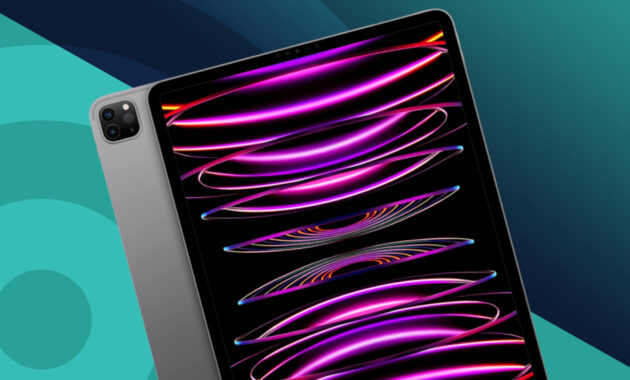
Best iPads 2026: Apple’s iPad lineup in 2026 delivers exceptional versatility, performance, and value for worldwide users—students, professionals, creators, and casual viewers alike. With the powerful M5 iPad Pro featuring tandem OLED displays, the capable M3 iPad Air, the affordable A16 iPad, and the portable iPad mini, there’s a perfect model for every budget and need. Apple Intelligence, Apple Pencil Pro support, and iPadOS multitasking make iPads more productive than ever.
Current iPad Lineup Overview (January 2026)
- iPad Pro (11″ & 13″): Flagship with M5 chip and Ultra Retina XDR tandem OLED display. Starting at $999 (11″ Wi-Fi).
- iPad Air (11″ & 13″): Thin, light, and powerful with M3 chip. Starting at $599 (11″ Wi-Fi).
- iPad (11″, A16 chip): All-screen everyday tablet. Starting at $349 (Wi-Fi).
- iPad mini (7th generation): Ultra-portable 8.3″ design, starting around $499.
All models offer 10-hour battery life, landscape front cameras for video calls, fast charging, and compatibility with Apple Pencil (USB-C or Pro) and Magic Keyboard.
Key Features Driving 2026 iPad Popularity
Displays — iPad Pro’s tandem OLED delivers 1000 nits brightness, 1600 nits HDR peak, 2,000,000:1 contrast, ProMotion (10-120Hz), and optional nano-texture glass. Air and standard iPad use vibrant Liquid Retina IPS with True Tone and P3 color. Mini offers compact Liquid Retina.

Performance & AI — M5 (Pro) and M3 (Air) chips excel at demanding tasks like 4K video editing, 3D rendering, and AI features (Image Wand, Clean Up, Live Translation, ChatGPT integration). The A16 iPad handles daily tasks smoothly but lacks full Apple Intelligence.
Cameras & Connectivity — 12MP wide rear + landscape 12MP Ultra Wide front (Center Stage). Pro adds ProRes 4K video and LiDAR. Wi-Fi 7 (Pro), Wi-Fi 6E (Air), 5G cellular options, Thunderbolt/USB 4 (Pro), and USB-C across the line.
Accessories — Apple Pencil Pro (squeeze, hover, barrel roll), Magic Keyboard (trackpad + function row), and Magic Keyboard Folio for entry-level.

Best iPads Models Comparison Table
| Model | Sizes | Chip | Display Type | Storage Options | Starting Price (Wi-Fi) | Weight (approx.) | Best For |
|---|---|---|---|---|---|---|---|
| iPad Pro | 11″, 13″ | M5 | Tandem OLED, ProMotion 120Hz | 256GB–2TB | $999 (11″) | 0.98 lb | Pros, creators, video editors |
| iPad Air | 11″, 13″ | M3 | Liquid Retina IPS | 128GB–1TB | $599 (11″) | 1.01 lb | Students, productivity, drawing |
| iPad (standard) | 11″ | A16 | Liquid Retina IPS | 128GB–256GB | $349 | 1.05 lb | Everyday use, kids, casual |
| iPad mini | 8.3″ | A17 Pro (est.) | Liquid Retina IPS | 128GB–512GB | $499 | 0.66 lb | Reading, travel, portability |
Who Should Buy Which iPad?
iPad Pro — Choose the M5 iPad Pro for professional video production, graphic design, music composition, or 3D work. The 13″ offers desktop-like canvas; tandem OLED is unmatched for HDR content and color-critical tasks.
iPad Air — Best all-rounder for most users. Excellent balance of power, price, and portability. Ideal for students taking notes with Pencil Pro, multitasking, or light creative work.
Standard iPad (A16) — Perfect budget option for web browsing, streaming, email, homework, or as a family tablet. Sufficient for 90% of daily tasks without breaking the bank.

iPad mini — Best for one-handed use, reading e-books, comics, or travel. Surprisingly capable for note-taking and casual gaming.
Pricing & Buying Tips
Prices start at $349 and go up to $2,000+ configured. Check education pricing (savings of $50–$100), trade-in (up to $685), and carrier deals for cellular models. Buy during back-to-school or holiday sales for extra discounts. All models receive 5–7 years of iPadOS updates.
FAQs
1. Which iPad is best for students in 2026?
The iPad Air (11″ M3) offers the best value—powerful enough for multitasking, note-taking, and apps like GoodNotes or Notability, plus Pencil Pro support, at a reasonable price.
2. iPad Pro vs iPad Air: Which should I buy?
Pro if you need OLED, 120Hz ProMotion, Thunderbolt, LiDAR, or top-tier performance for ProRes video/3D. Air suffices for 95% of users and saves $400+.
3. Does every iPad support Apple Intelligence?
No. Full features require M3/M5 or newer (Air & Pro). The A16 iPad has limited or no support.
4. How long does the iPad battery last?
Up to 10 hours of web surfing or video playback (Wi-Fi). Pro/Air reach 50% charge in ~30 minutes with compatible chargers.
5. Is the 2026 standard iPad still worth buying?
Yes—especially at $349. It’s colorful, fast for daily use, and receives long software support. Great starter or secondary device.
6. Should I wait for new 2026 Best iPads?
The M5 Pro is very recent (Oct 2025). iPad Air M4 and entry-level A19 models are expected later in 2026. Buy now if you need one.
7. Which iPad has the best display?
The iPad Pro with tandem OLED—brightest, highest contrast, smoothest refresh rate.
8. Can I use an Best iPads as a laptop replacement?
Yes, especially Pro or Air + Magic Keyboard. iPadOS supports Stage Manager, external displays (up to 120Hz on Pro), and thousands of productivity apps.
Apple’s 2026 iPad lineup stands out for quality, ecosystem integration, and longevity. Assess your primary uses (note-taking, media consumption, professional work) and budget, then choose the model that fits. The iPad Air is the sweet spot for most people, while the Pro delivers the ultimate experience. Visit apple.com or authorized retailers worldwide to compare in-store and take advantage of current deals.
The Review
Review Breakdown
- Design
- Display
- Camera Quality
- Performance
- Battery
- Build Quality
- Software Updates
- Value of Money